Skip to content
No results
  • About
  • Home
  • Legal – Harneet Pasricha
Harneet Pasricha

Get more out of your tech

  • About
  • Categories
    • AI
    • Amazon
    • Android
    • Apple
    • Gmail
    • Google
    • Instagram
    • Life Hacks
    • Mac
    • Money Matters
    • Motivation
    • Movies
    • Music
    • Netflix
    • Products I Love
    • Smart Home
    • Sports
    • Technology
Harneet Pasricha

Get more out of your tech

Android 7.0 Nougat: Split Screen

  • Harneet Pasricha
  • August 24, 2016
  • All, Android, Google

android-nougat-split-screen-harneet-pasricha

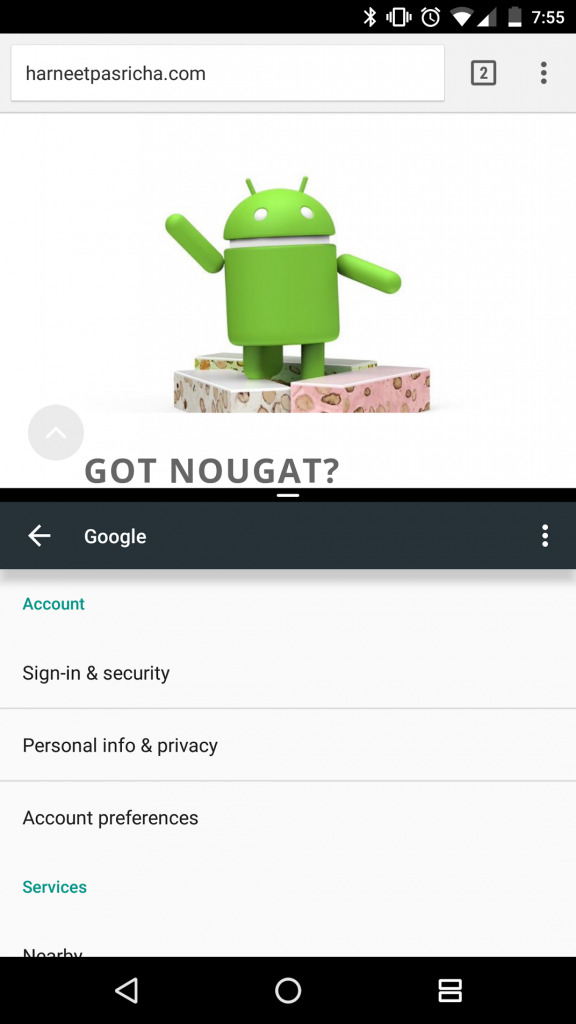
Need 2 apps on one screen?

Press the recent apps button

Long press the first app you want split

Drag up to the top of the screen where it says “Drag here to use split screen”

Press the recent app button again

Select the 2nd app

*To exit split screen long press the recent apps button

 

Share this:

  • Share on WhatsApp (Opens in new window) WhatsApp
  • Share on Facebook (Opens in new window) Facebook
  • Share on LinkedIn (Opens in new window) LinkedIn
  • Share on Bluesky (Opens in new window) Bluesky
  • Share on Tumblr (Opens in new window) Tumblr
  • Share on Pinterest (Opens in new window) Pinterest
  • Share on Reddit (Opens in new window) Reddit
  • Email a link to a friend (Opens in new window) Email
  • Share on Threads (Opens in new window) Threads
  • Share on X (Opens in new window) X
  • Print (Opens in new window) Print
  • Block Excessive Notifications from Any App in Lollipop with a Long Press (Android)
    Date
    July 4, 2015
    In relation to
    All
  • 10 Ways to Make Android Auto Better Today
    Date
    October 9, 2025
    In relation to
    All
  • 20 Clever Ways to Customize Your Mac’s Dock
    Date
    June 28, 2025
    In relation to
    Mac

Categories

Copyright © 2026 Harneet Pasricha