

Play/pause button suddenly stopped working on your Mac?
Me too. Turns out if you have the Google Play extension in Chrome a recent update screwed it up. Here’s how to fix it:
- Choose Preferences in the Chrome menu in the menu bar
- Click Extensions in the left sidebar
- Scroll all the way to the bottom of the page
- Click Keyboard Shortcuts
- Look at the key bindings in the Google Play Music section
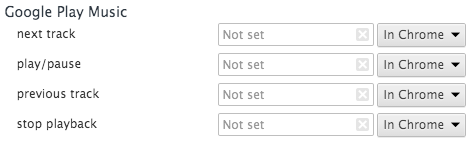
Hit the x on all 4 options OR set them to “In Chrome”