
You know that feeling when your Instagram feed stops feeling like you? Maybe your tastes have shifted, or the algorithm just went sideways somewhere along the way. The good news is that Instagram actually lets you wipe the slate clean and start fresh with suggested content.
Here is how to do it, and a few extra tips to take back control of what you see.
Why Your Instagram Algorithm Feels Off
When you first joined Instagram, you interacted with certain posts, accounts, and topics. Over time, the algorithm built a profile of your interests based on all of that activity. The problem is that people change. What you liked three years ago might not be what you want to see today.
Instagram’s algorithm is designed to show you content it thinks you will engage with. But if it has learned the wrong lessons, your Explore page and suggested reels can start to feel like a stranger’s feed.
How to Reset Your Suggested Content on Instagram
Resetting your algorithm is straightforward once you know where to look. Here is exactly what to do:
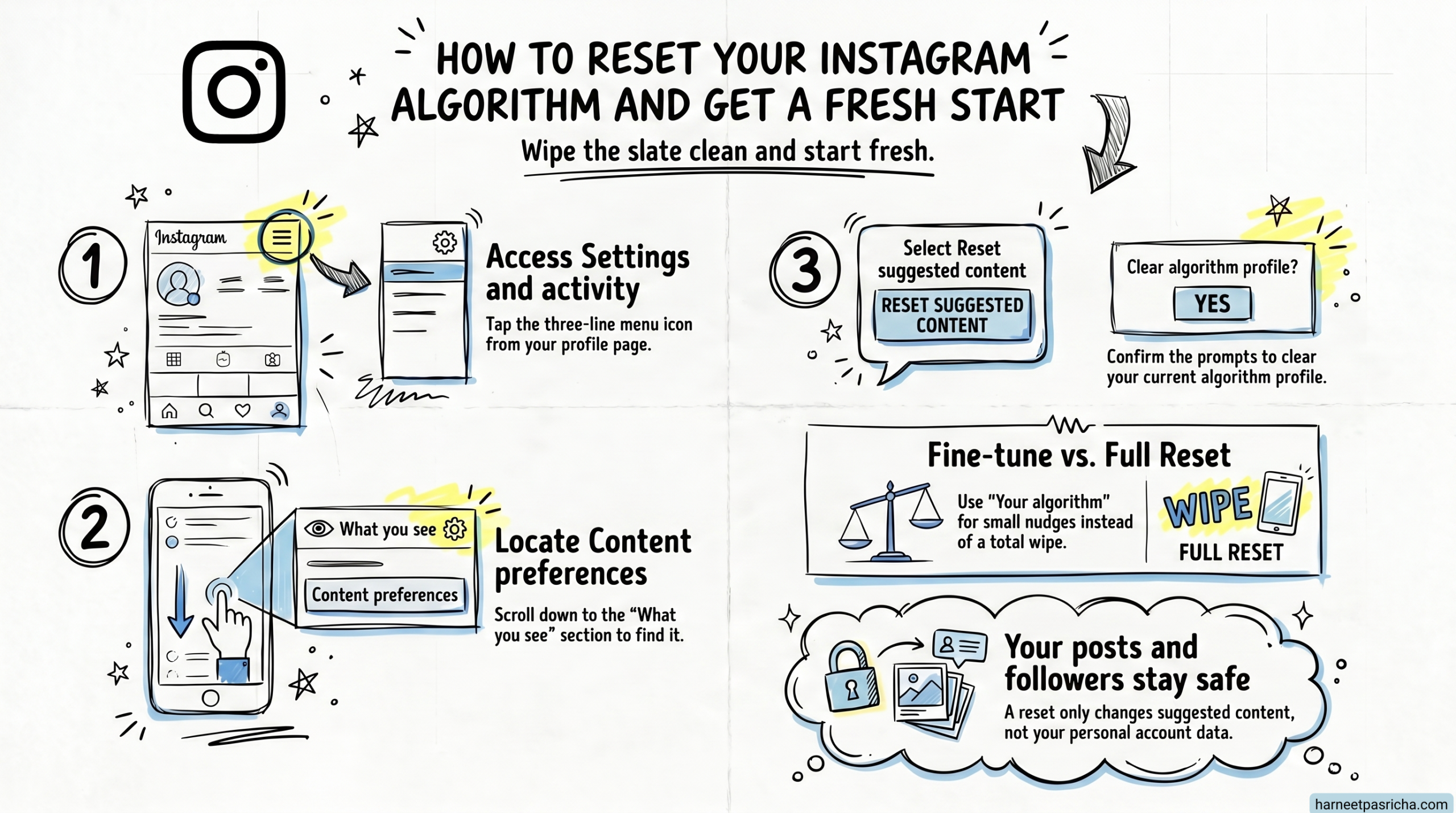
- Open Instagram and tap your profile icon in the bottom right corner.
- Tap the menu icon (three lines) in the top right, then go to Settings and activity.
- Scroll down until you see the What you see section.
- Tap Content preferences.
- Select Reset suggested content.
- Follow the on-screen prompts to confirm the reset.
That is it. Instagram will clear out its suggestions and start fresh, learning your preferences again from your future interactions.
Want to Fine-Tune Instead of Reset?
If a full reset feels like too much, you have another option. Inside the same Content preferences menu, tap Your algorithm. From there, you can make specific adjustments without blowing everything up. It is a handy middle ground if you just want to nudge the algorithm in a different direction rather than starting from zero.
A Few Other Instagram Features Worth Exploring
While you are poking around in settings, a couple of other features are worth knowing about.
Vanish Mode lets you send messages that disappear after they are seen, which is great for casual conversations you do not need a record of.
Instagram for iPad is a relatively recent addition. If you use an iPad regularly, it is worth checking out the dedicated experience rather than squinting at the phone version scaled up.
Instagram keeps adding features, so it is always worth exploring the app every once in a while. The people who get the most out of it are usually the ones who take a few minutes to understand what is actually available to them.
FAQ
No, it will not. The reset only affects suggested content and the algorithm’s understanding of your interests. Your posts, followers, and following list stay exactly as they are.
It varies, but you should start seeing noticeable changes within a few days of actively using the app. The more you engage with content you actually enjoy, the faster the algorithm picks up on your updated tastes.
No. Your main feed from accounts you already follow is separate. The reset primarily impacts suggested posts, reels, and the Explore page.
Yes, the steps are the same on both Android and iPhone. The menus and layout are identical across both platforms.
Resetting clears everything and starts from scratch. Adjusting through the “Your algorithm” option lets you make smaller tweaks, like telling Instagram to show you more or less of certain types of content, without losing all of your existing preferences.