
Nobody enjoys calling a store to check stock or sitting on hold to move an appointment. Google’s new Gemini Call for Me feature on the Pixel 11 wants to take those calls off your plate.
What Gemini Call for Me Actually Does
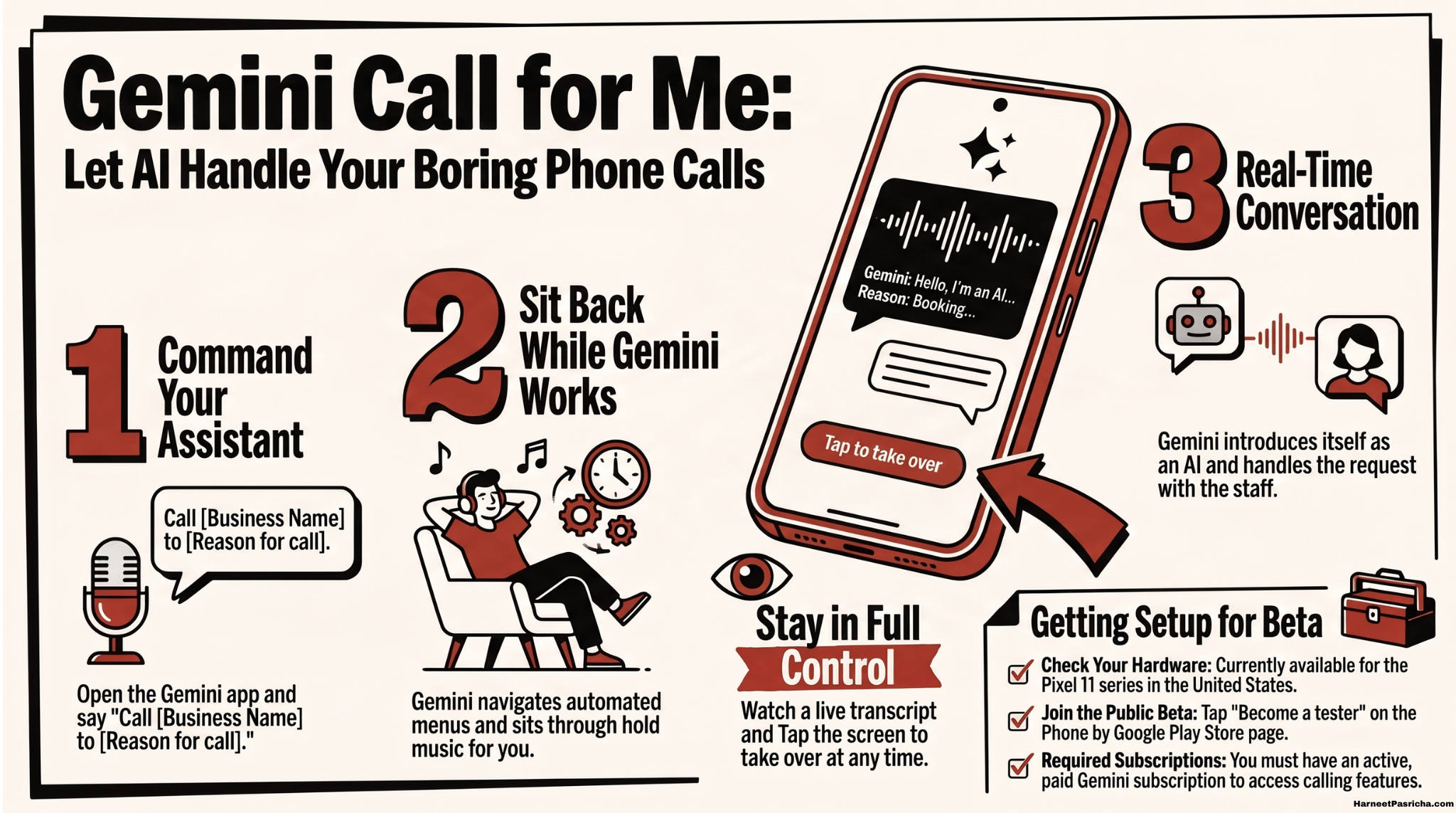
- It makes the whole call. You tell Gemini what you need, and it dials the business, talks to whoever answers, and sends you a summary when it’s done.
- It handles menus and hold time. Call for Me uses Direct My Call to get through phone menus and Hold for Me to wait in line, so you skip both.
- It’s upfront about being AI. Gemini introduces itself as an AI assistant calling for you before it gets to your request.
- You stay in control. A live transcript shows in the Gemini app, and you can jump in and take over at any point.
- It uses your number. The business sees the call coming from your phone, not a random line.
Who Can Use It Right Now
This is an early preview, so the requirements are strict:
- A Pixel 11 series phone. That includes the Pixel 11, 11 Pro, 11 Pro XL, and 11 Pro Fold.
- A paid Gemini subscription. Free Gemini users are left out for now.
- The Phone by Google public beta. The feature is not in the regular version of the app.
- US and English only. Google is starting small while it works out the rough spots.
How to Get Set Up
- Open Google’s Phone app beta testing page on your Pixel 11.
- Go to the Phone app’s Play Store listing and tap Become a tester.
- Let the beta update install, then open the Gemini app.
- Ask Gemini to call a business with a clear request, like “Call the hardware store on Main Street and ask if they have a 10-foot ladder in stock.”
- Answer any follow-up questions Gemini asks, then watch the transcript or go about your day until the summary arrives.
Good Calls to Hand Off
- Stock checks. Find out if a local shop carries an item before you make the drive.
- Rescheduling. Move a haircut or similar appointment to a new day and time.
- Reservations. Book a table or ask for a patio or quiet spot.
- Order changes. Add something to a takeout order you already placed.
- Holds. Ask a store to set an item aside so it’s ready when you arrive.
Where to Be Careful
- Keep it routine. Call for Me is built for businesses and will not call emergency services.
- Expect some hang-ups. Busy staff may think an AI voice is spam, so have a backup plan for anything urgent.
- Share only what’s needed. Gemini can pass along personal details you approve, so think twice before handing over more than a name and a time.
- Beta means bugs. Google says beta versions of the Phone app can be unstable and suggests avoiding them on your main phone, which is tricky if your Pixel 11 is your only phone.
- No guaranteed yes. Gemini can ask, but it can’t make a business agree. If the request can’t be met, it politely ends the call.
Why This Feels Different
- Google has tried this before. Duplex once booked restaurant tables through Google Assistant before Google shut it down.
- Gemini is more flexible. Instead of a narrow set of tasks, Call for Me aims to handle real back-and-forth conversation.
If you already lean on Gemini for everyday tasks, like the ones in my roundup of things you can do with Google Gemini, this feels like a natural next step. Low-stakes calls are the best way to see whether it earns your trust.
It’s a new Pixel 11 feature that lets Gemini place phone calls to businesses for you. You tell it what you need, and it handles the conversation, phone menus, and hold time, then sends you a summary.
Right now it only works on the Pixel 11 series, which includes the Pixel 11, 11 Pro, 11 Pro XL, and 11 Pro Fold. Older Pixels are not included in the preview.
Yes. You need a paid Gemini subscription, and you also have to join the Phone by Google public beta. The feature is limited to the US and English for now.
Yes. Gemini introduces itself as an AI assistant calling on your behalf before it gets to your request, so the person on the other end knows what’s going on.
Absolutely. The Gemini app shows a live transcript while the call is happening, and you can take over the conversation at any point.
It’s built for routine business calls, like checking if a store has something in stock, rescheduling an appointment, booking or changing a reservation, updating a takeout order, or asking a shop to hold an item. It won’t call emergency services.
Gemini can’t force a yes. If the request can’t be met, it will politely end the call and let you know how it went.