
I’ve wanted an easy way to make short videos without learning a real video editor. Google just made that a lot simpler. As of today, Google Vids AI video generation is free for anyone with a regular Google account, not just people paying for Workspace.
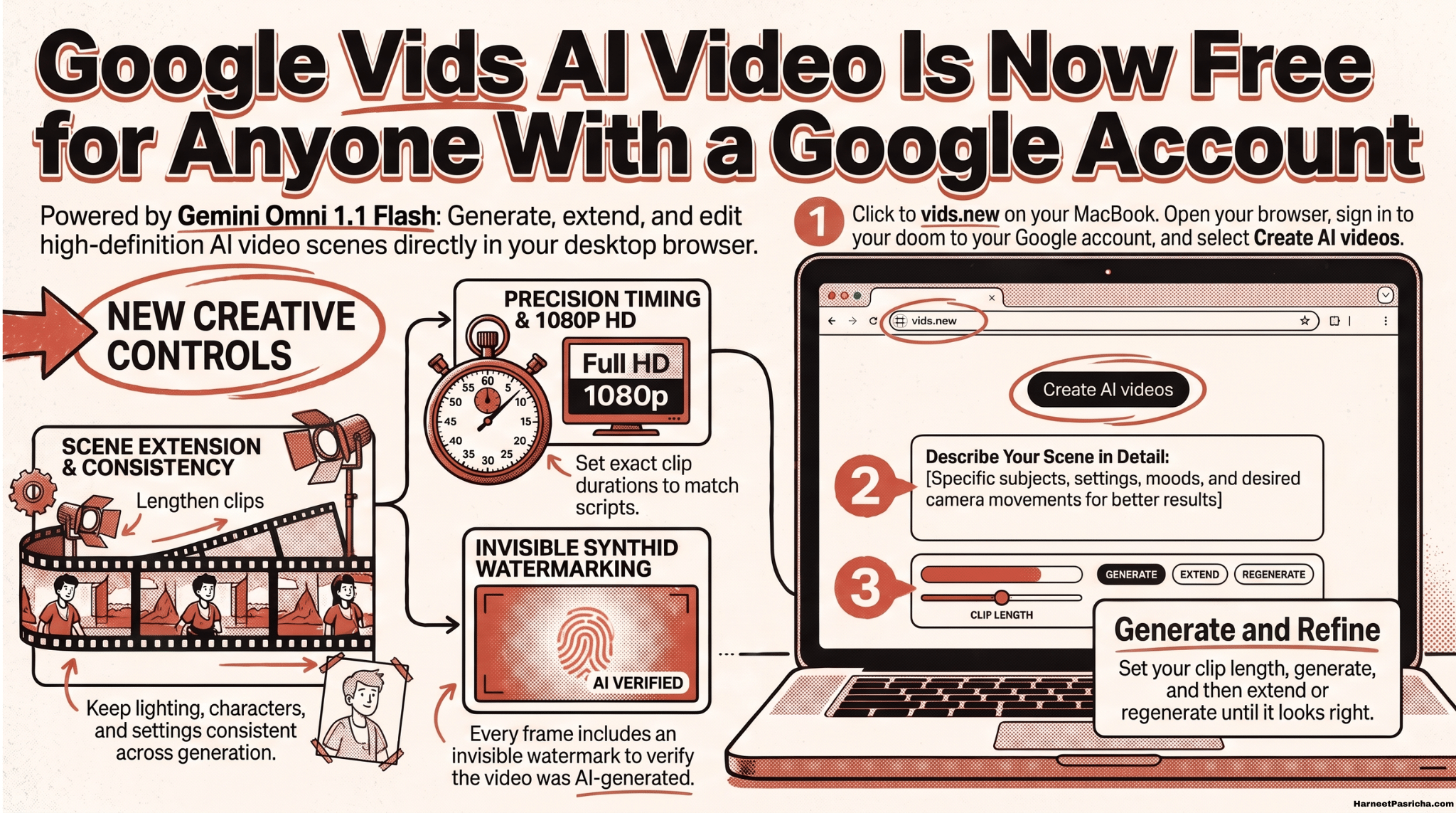
The engine behind it is Gemini Omni 1.1 Flash, Google’s newest video model. You describe a scene, and Vids builds it. What caught my eye is the amount of control you get. This isn’t just a prompt box and a hope for the best.
What Changed in Google Vids
Vids started life as a work tool, and the AI video features mostly sat behind paid plans. According to Google’s announcement, anyone with a Google or Workspace account can now generate videos at no cost.
You also get three new controls that make the results feel more intentional:
- Scene extension. You can make a clip run longer while keeping the lighting, characters, and setting consistent.
- Exact durations. You pick precisely how long a clip should be, so it lines up with your script.
- Full 1080p HD. New scenes come out in HD, and you can upscale older AI clips to match.
How to Make Your First Google Vids AI Video
The whole thing runs in a browser, but only on desktop for now.
- On your computer, go to vids.new.
- Sign in with your Google account.
- From the creation menu, choose Create AI videos.
- Describe your scene. Include the subject, the setting, the mood, and how the camera should move.
- Set the clip length and generate.
- Extend the scene or regenerate until it looks right, then add it to your timeline.
- Build out the rest of your video with more scenes, text, and music.
Your project saves to Google Drive like any other file, so it’s easy to find and share later. If you haven’t explored Drive in a while, I covered some Google Drive features most people ignore that pair well with this.
A quick prompting tip: the same habits that get better answers from a chatbot work here too. Be specific, give context, and iterate. I wrote about that in 5 tips to get better answers from ChatGPT, and every one of them applies to video prompts.
Where I Think This Really Shines
The obvious use is social media clips. But I think the bigger win is for people who never would have made a video at all.
Think of a small shop owner. Snap a few photos of new stock, drop them into Vids, and turn them into a short promo. Your photos matter a lot here, so steady shots help. A basic phone tripod and a small ring light go a long way.
It’s also great for a school fundraiser, a club event, or a quick product teaser for a side project. Vids has ready-made templates to get you started fast.
Heads up: some links here are affiliate links. If you pick something up through them, I get a small commission. It does not change the price for you at all.
A Few Things Worth Knowing
- Every clip is watermarked. Google embeds an invisible SynthID watermark in each generated frame. You won’t see it, but it lets people verify the video was made with AI. I think that’s the right call.
- Free has limits. Google hasn’t made it unlimited. If you need more generations on a personal account, Google AI plans raise the cap. Workspace Business and Enterprise plans get bigger pools too.
- Voiceovers are coming. Google says Gemini text-to-speech is on the way. You’ll be able to type a script and get natural narration in over 100 languages.
For a free tool, this is a surprisingly capable setup. The controls are what make it worth trying. Being able to set exact lengths and stretch a scene without it falling apart is the difference between a novelty and something you’d actually publish.
Yes. Anyone with a personal Google account or a Google Workspace account can generate AI videos in Google Vids at no cost. There are usage limits, though, so it isn’t unlimited.
It uses Gemini Omni 1.1 Flash, Google’s latest video generation model. That’s what powers the scene creation, scene extension, and HD output.
Not for creating AI videos right now. Google says to go to vids.new on a desktop computer and choose Create AI videos to get started.
New AI scenes are generated in full 1080p HD. You can also upscale older AI clips so everything on your timeline matches.
Every clip includes an invisible SynthID watermark. Viewers won’t see it, but it can be used to verify that the content was AI generated.
Not yet with AI narration, but it’s coming. Google says Gemini text-to-speech will soon turn a typed script into a natural voiceover in more than 100 languages.
Personal accounts can upgrade to a Google AI plan for more access. Workspace Business and Enterprise plans include larger generation pools and admin controls.