
Google Wallet is getting a handy update through Google Play Services v26.40, and the headline feature is Google Wallet receipts. Here is what changed and how to check if your phone has it yet.
What Google Wallet Receipts Do
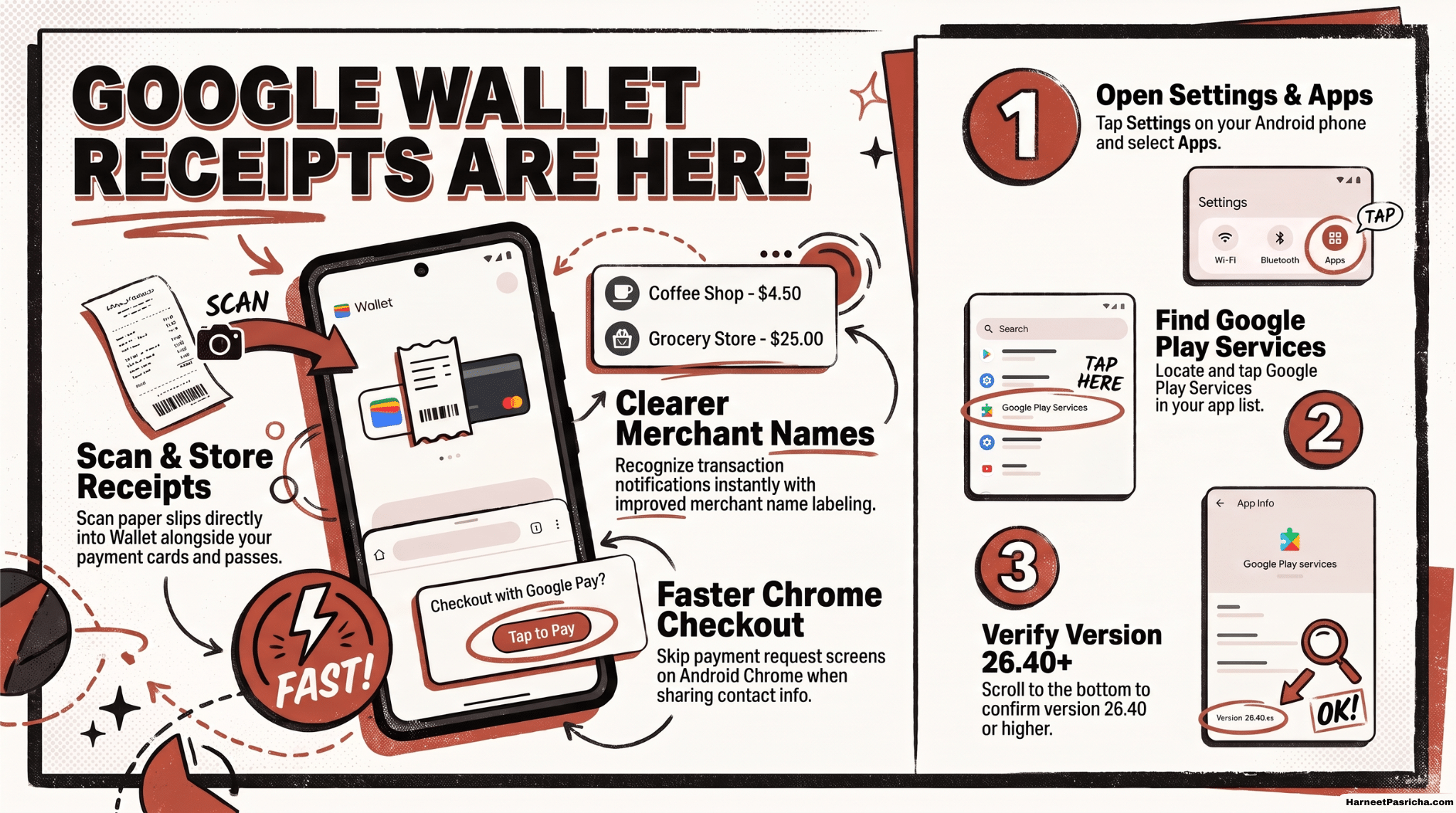
- Scan to add: You can now scan to add receipts in Wallet, so a paper slip can live in the same app as your cards and passes.
- Save and view: Receipts you scan are stored in Wallet, which means they are on the phone you already pay with.
- Details are thin: Google’s release note is only one line. It does not explain how receipts are sorted or searched, so expect the finer points to show up as the rollout reaches more phones.
What Else Changed in Wallet
- Clearer merchant names: Transaction notifications now show improved merchant names, which makes it easier to recognize a charge at a glance. If you sometimes miss those alerts, this hidden Android notification setting is worth a look.
- In-app message center: Wallet now has a message center of its own. Google has not said yet what kind of messages will land there.
- Faster checkout in Chrome: On Chrome for Android, Google Pay can skip the Payment Request screen when you share your name, email, and phone number with a merchant. That is one less screen between you and a finished purchase.
How to Check Your Play Services Version
- Open Settings on your Android phone.
- Tap Apps.
- Find and tap Google Play Services.
- Scroll to the bottom and look at the version number. You want 26.40 or later.
Menu names can vary a little by phone brand, so use the search bar in Settings if you do not see the Apps option right away.
Good to Know
- Gradual rollout: The update arrives automatically. If the new options are missing, they will likely show up in the next few days.
- Phone only: These Wallet changes are listed for phones.
- Check the source: Google lists every monthly change on its system services release notes page.
- Protect your cards: Wallet holds your payment cards, so a quick account checkup is smart. This guide on how to secure your Google account in 15 minutes covers the basics.
None of these upgrades is huge on its own. Together, they make Wallet a little more useful for everyday spending.
Four things: you can scan to add receipts, merchant names in transaction notifications are improved, Wallet has a new in-app message center, and Google Pay in Chrome for Android can skip a checkout screen.
Google Play Services v26.40. Google’s release notes date it October 12, 2026.
No. The update rolls out automatically, so the features may take a few days to reach your phone.
Open Settings, tap Apps, tap Google Play Services, then scroll to the bottom to see the version number. Menu names can differ by phone brand.
When you give a merchant your name, email, and phone number, Google Pay in Chrome for Android can skip the Payment Request screen, so checkout has one fewer step.
The release note is for Google Play Services, which is an Android component, so these changes apply to Android phones.