
If you use Google Drive regularly, you have probably run into the same problem. Files are in there somewhere, but finding the right one at the right time is a whole other challenge. Google Drive Projects is the feature that quietly fixes this, and once you try it, going back feels hard.
It does not reinvent Drive. It just makes it far more useful for anyone juggling multiple tasks at once.
What Is the Projects Feature in Drive?
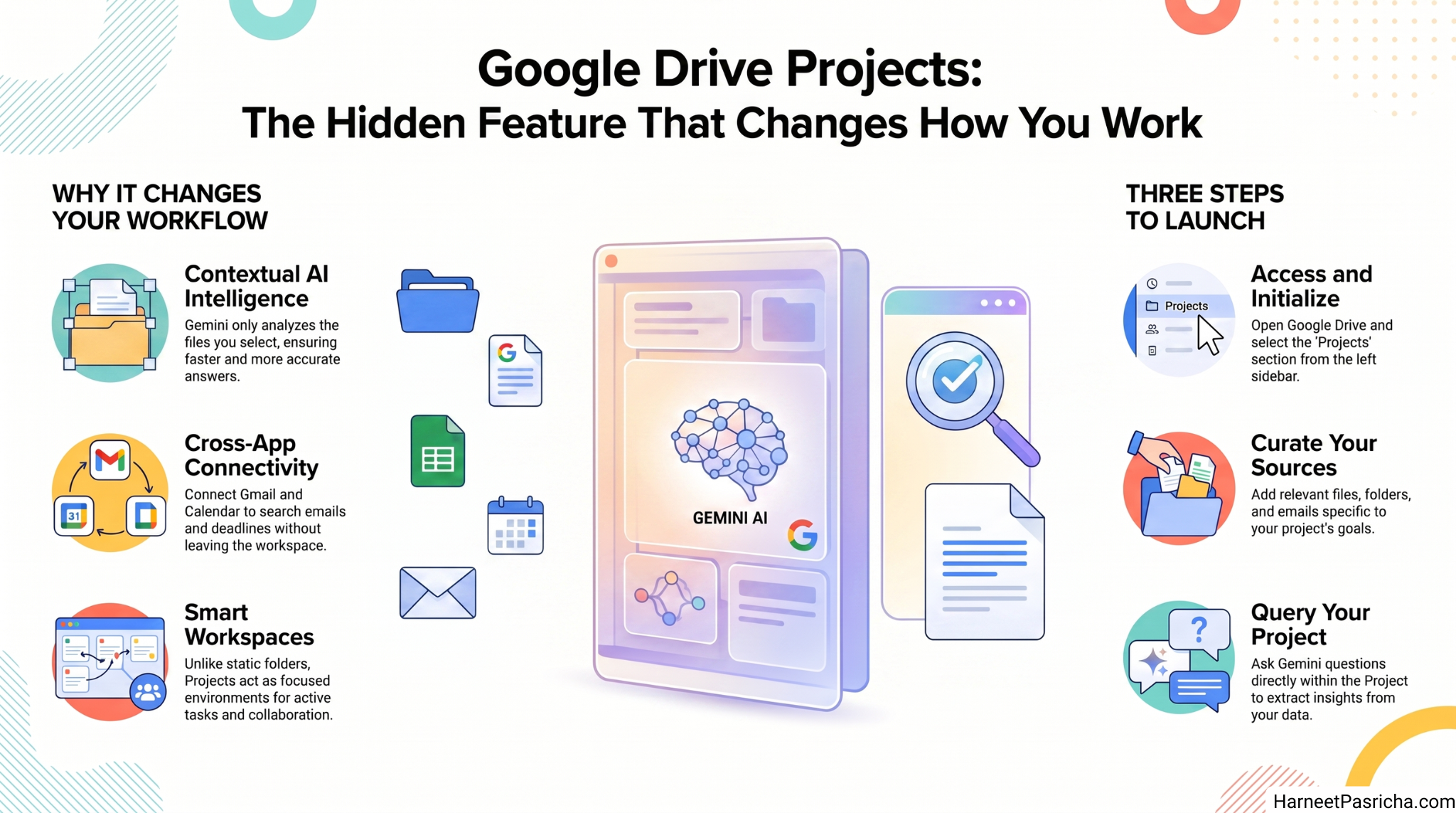
Google Drive Projects lets you create a focused workspace around a specific task. Think of it like a smart folder with AI built in.
You add the files that matter for one task, and Gemini, Google’s built-in AI assistant, can answer questions using only those files. No digging through your entire Drive. No wading through years of unrelated documents.
It is the difference between asking someone to search a whole library and handing them the three books they actually need. If you have already been using Gemini inside Google Drive, this takes that experience to a new level.
How to Set It Up in Two Minutes
- Open Google Drive on your phone or in a browser.
- Find the Projects section in the left sidebar.
- Tap or click New Project and give it a name.
- Add files, folders, or sources from Drive that are relevant to your task.
- Start asking Gemini questions directly inside the Project.
No complicated setup. No new apps to download.
Why It Actually Makes a Difference
The magic is in the boundaries you set.
When you ask Gemini something inside a Project, it only looks at the files you have added. This makes answers faster and more on point. Gemini is not trying to make sense of everything you have ever saved. It is focused on exactly what you gave it.
Say you are planning a home renovation. You have a budget sheet, some contractor quotes, and a few inspiration notes. Add them all to one Project. Now you can ask things like “What is the total cost across all quotes?” and get a useful answer right away.
This also saves time when you return to a task days later. The context is already there. You do not have to rebuild it from scratch.
For more ways to get more out of Google’s ecosystem, check out this guide on getting started with Gemini on Android.
Gmail and Google Calendar Connect Too
Projects can pull in information from more than just Drive files.
You can connect Gmail and Google Calendar to a Project as well. If an important detail is buried in an email, or you need to check a deadline, Gemini can find it without you switching apps.
Ask something like “Did I get an email about this last week?” and Gemini searches your inbox right there. Everything stays tied to the same task, in one place.
Who Gets the Most Out of It
Projects works especially well if you regularly juggle more than one thing at a time. Freelancers, students, small business owners, and anyone managing side projects will feel the difference fast.
Even for personal use, like planning a trip or tracking a big purchase, having one tidy workspace with Gemini on hand makes things noticeably easier.
Google Drive has always been great for storing files. Projects makes it great for actually getting things done.
FAQ
What is Google Drive Projects? It is a feature in Google Drive that lets you build a focused workspace for a specific task. You add relevant files and Gemini uses only those to answer your questions.
Do I need a paid Google plan to use Projects? Projects with Gemini is available to users who have Gemini access through their Google account. Some features may require a Google One or Workspace plan depending on your region.
Can I share a Project with someone else? Yes. Just like regular files in Drive, you can share an entire Project with friends, family, or colleagues.
Does it work on mobile? Yes. You can access Projects from the Drive app on Android and iOS as well as from a browser on desktop.
Can Gemini read my emails inside a Project? Only if you choose to connect Gmail to that Project. You are in control of what sources Gemini can access.
Is there a limit to how many Projects I can create? Google has not announced a hard limit. You can create multiple Projects for different tasks without needing to delete old ones.
Can I add web links or external sources to a Project? Currently, Projects focuses on files from Drive along with Gmail and Calendar. External URLs are not directly supported as sources at this time.