
Every Search You Make Is Feeding Google’s AI — Unless You Do This
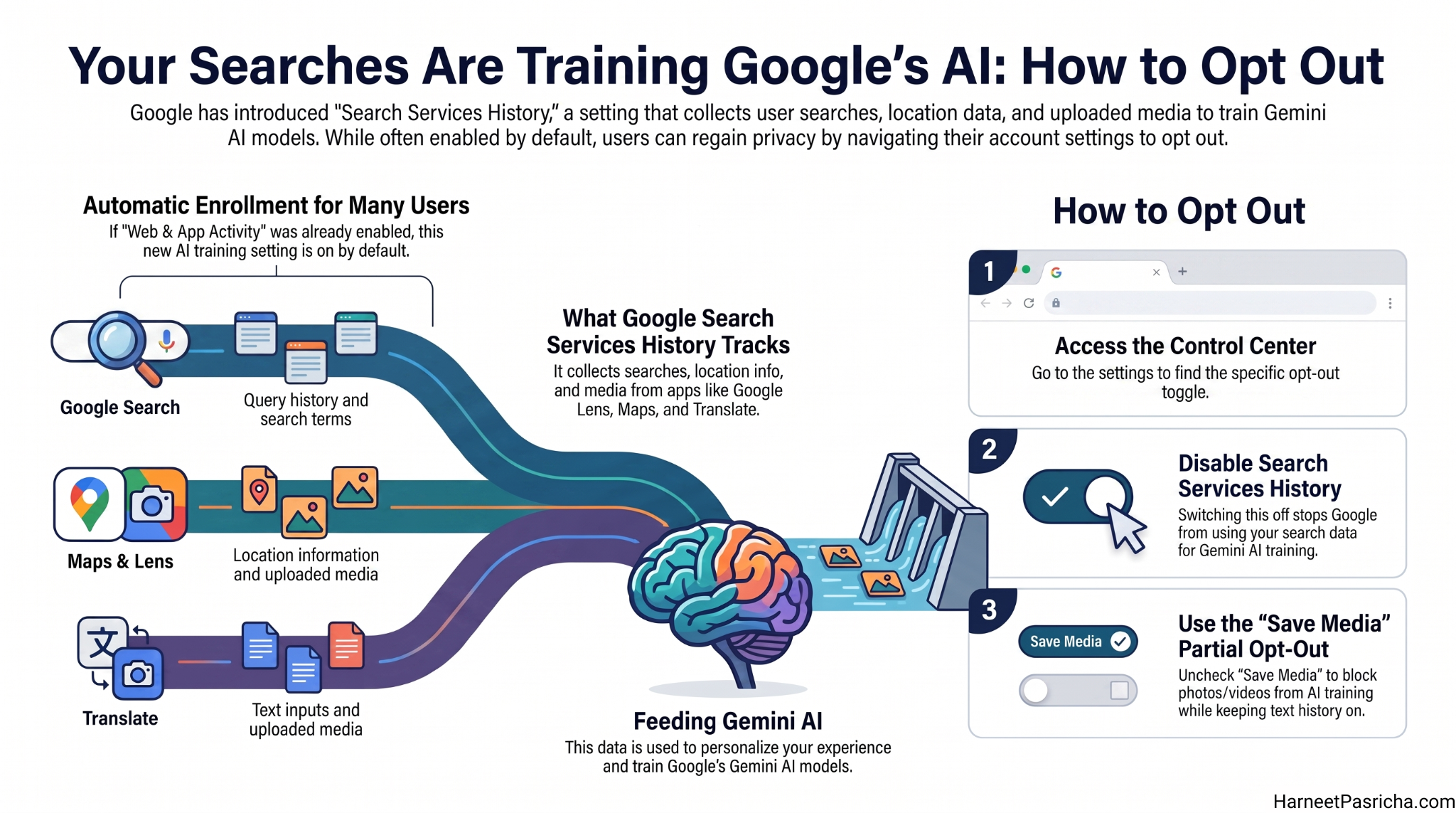
Most people don’t realize that Google search AI training is already happening in the background. Every time you search, use Google Lens, or ask Google Translate for help, that activity can go toward training Gemini, Google’s AI. A new setting called Search Services History is rolling out now, and it’s worth knowing how to control it.
How to Stop Google Search AI Training
Once the Search Services History setting appears in your account, here is what to do:
- Go to myactivity.google.com/search-services/settings and sign in.
- Find the Search Services History toggle and switch it off.
- Want to keep history on but block your photos and videos? Uncheck the Save Media checkbox.
- To stop Google from personalizing results based on this data, go to myaccount.google.com, then navigate to Data & privacy > Personalization settings and turn off Personalized Recommendations.
The setting is rolling out gradually, so it may not be in your account yet. If you don’t see it, check back in a few weeks.
What the Setting Actually Collects
Search Services History pulls in data from a wider range of apps than most people expect. It covers:
- Google Search
- Google Lens
- Google Maps
- Google Translate
- Google News
- Shopping, flights, and hotel searches
It also includes your general location and any media you upload, like photos or videos you share with Lens or Search Live.
What to Do Right Now If the Setting Isn’t There Yet
The rollout is expected to take a few months. In the meantime, head to your Google account and review your Web & App Activity controls. Turning that off limits what Google collects while you wait for the new setting to arrive.
Does Google Anonymize Your Data First?
Somewhat. Google says it disconnects your data from your account before any human reviews it for AI training. It also filters out sensitive personal information. Before your photos or videos get reviewed by a real person, Google says it will ask for your permission first.
One exception: if your Google account is managed by a school or educational institution, your data will not be used for Google search AI training by default.
If you want to dig deeper into how Google handles data across its products, the Google Privacy & Terms site has the full picture.
Your searches say a lot about you. It is good that Google is offering more control here — just make sure you are the one making the call.
It’s a new setting rolling out to Google accounts that collects your searches, location info, and uploaded media from apps like Google Lens, Maps, Translate, and more. Google uses this data to personalize your experience and to train its Gemini AI models.
If you already had Web & App Activity enabled in your Google account, then yes — Search Services History will be on by default when it rolls out to your account.
Once the setting appears, go to myactivity.google.com/search-services/settings, sign in, and switch off Search Services History. You can also keep history on but block just your photos and videos by unchecking the Save Media option.
The rollout is gradual and could take a few months. In the meantime, check your Web & App Activity settings in your Google account — turning that off reduces how much Google collects from your daily activity.
Google says it disconnects data from your account before human reviewers see it and filters out sensitive personal details. It also says it will ask permission before using your photos or videos specifically.
If you turn off Search Services History and also disable Personalized Recommendations under Data & privacy in your Google account, Google will stop customizing Search results and AI responses based on your history.